
Download 7 Web – Browse Websites, iPhone App, iOS App, iCloud Sync
Overview
7 Web is a streamlined mobile application designed to simplify web browsing for iPhone users. Developed by Spaceage Labs Private Limited, the app falls within the Education & Reference category, specifically under Books, indicating its utility as a tool for organizing and accessing digital content. The primary purpose of 7 Web is to allow users to consolidate their most frequently visited websites into a single, accessible interface. By selecting up to seven favorite sites, users can launch them with a single tap, eliminating the need to open multiple browser tabs or navigate through various apps. This functionality is especially beneficial for individuals who regularly access news portals, social media platforms, or specialized information hubs throughout the day.
The app addresses the common frustration of fragmented digital workflows, where users must switch between multiple applications or browser windows to stay updated. With 7 Web, the browsing experience becomes more efficient and focused. Real-world use cases include professionals monitoring industry news, students accessing academic resources, and casual users keeping up with social networks or entertainment sites. The integration of iCloud sync ensures that users maintain consistent access across all their iOS devices, enhancing continuity and convenience. In the broader app ecosystem, 7 Web fills a niche for minimalist, purpose-driven tools that prioritize speed and simplicity over complex features.
Key Features & Functionality
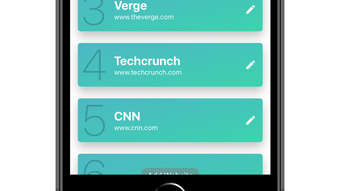
- Seven-Website Access: Users can select up to seven favorite websites to appear directly on the app’s home screen, enabling instant access with a single tap.
- One-Tap Launch: All saved websites open simultaneously upon activation, reducing time spent navigating to each site individually.
- Swipe Navigation: Seamless horizontal swiping allows users to switch between open websites without reloading or losing context.
- iCloud Sync: Website selections and browsing preferences are automatically synchronized across all iOS devices using iCloud, ensuring consistency across iPhone, iPad, and iPod Touch.
- Minimalist Design: The interface is clean and uncluttered, focusing solely on website access without distractions such as ads or unnecessary menus.
For example, a user interested in tech news might set up 7 Web with sites like TechCrunch, The Verge, and Wired. Upon launching the app, all three load instantly, and they can swipe between them effortlessly. Similarly, a student preparing for exams could include educational portals, video lecture platforms, and research databases. The auto-sync feature ensures that when they switch from their iPhone to an iPad, their preferred sites remain available without reconfiguration. This level of integration supports a fluid, multi-device workflow, making 7 Web a practical utility for both personal and professional use.
Interface, UX & Performance
The user interface of 7 Web is designed with simplicity and efficiency in mind. The layout features a clean, card-based display where each of the seven selected websites is represented as a clearly labeled tile. The visual style is minimal, with a focus on readability and quick identification. Navigation is intuitive: users tap to open all sites at once, then swipe left or right to move between them. This gesture-based interaction is responsive and smooth, contributing to a seamless browsing experience.
Although the developer did not list formal performance metrics, the app’s design suggests optimized performance for typical iOS device capabilities. The lack of heavy animations or background processes indicates that it likely operates efficiently with minimal impact on battery life or system resources. Stability appears to be a priority, as the app’s core function—launching and switching between websites—relies on consistent behavior.
The absence of advertisements or intrusive elements further supports a stable and distraction-free environment. While specific device compatibility details were not disclosed, the app is built for iOS, suggesting it functions across a wide range of iPhone models and iPad generations. Overall, the UX is tailored for users who value speed, clarity, and ease of access.
Platform Compatibility & Technical Requirements
7 Web is available exclusively for iOS devices. The app is compatible with iPhone models running the latest versions of the iOS operating system. The file size is reported as 10.2 MB, indicating a lightweight footprint that should not significantly impact device storage.
The developer did not specify minimum OS requirements or detailed hardware compatibility. However, given the app’s reliance on iCloud sync and native iOS features, it is designed to function optimally on devices that support modern iOS versions. The app is free to download and install, with no in-app purchases or subscription fees mentioned.
Users can access the latest version through the App Store without additional costs.
Pros and Cons
Pros
- Effortless access to up to seven favorite websites with a single tap
- Seamless swipe navigation between open sites
- iCloud sync ensures consistent experience across all iOS devices
- Minimalist interface with no ads or distractions
- Lightweight file size (10.2 MB) for quick installation
- Free to download and use with no hidden costs
Cons
- Maximum of seven websites may limit users with extensive browsing needs
- No option to customize the layout or arrangement of website tiles
- Specific performance data or device compatibility details were not provided
- Only available on iOS, limiting access for Android or other platforms
- Functionality is limited to website access—no search, history, or bookmark management
FAQ
Is 7 Web available for Android devices?
7 Web is currently available only for iOS devices. There is no official Android version announced by the developer.
Can I use 7 Web without an iCloud account?
While the app supports iCloud sync, it may still function without an iCloud account. However, synchronization across devices will not be available without iCloud.
How do I update 7 Web?
Updates are delivered through the App Store. Users can check for updates in the App Store’s “Updates” section or enable automatic updates.
Is 7 Web safe to use?
As a free app from a known developer, Spaceage Labs Private Limited, and distributed through the official App Store, 7 Web is considered secure. It does not require sensitive permissions beyond standard web access.
Can I add more than seven websites?
Currently, the app limits users to selecting up to seven websites. There is no built-in option to exceed this limit.
Final Thoughts
7 Web offers a refreshingly simple solution for users who want to streamline their web browsing on iPhone. Its core strength lies in eliminating the clutter of multiple browser tabs and apps by consolidating favorite sites into a single, intuitive interface. The ability to launch all selected websites at once and navigate between them with a swipe enhances productivity and reduces cognitive load. The inclusion of iCloud sync ensures that users enjoy a consistent experience across all their iOS devices, a significant advantage for those managing multiple gadgets.
While the app has limitations—such as the fixed number of websites and lack of advanced features like search or history—it excels in its niche. It’s ideal for professionals, students, and casual users who prioritize speed and simplicity over comprehensive browsing tools. For anyone seeking a secure, lightweight, and free utility to boost daily efficiency, 7 Web delivers real value. If you're looking to simplify your digital workflow and access your favorite sites faster, this app is worth trying.
Download 7 Web now.







